
42 lines
1.7 KiB
Markdown
42 lines
1.7 KiB
Markdown
Welcome,
|
|
|
|
Thank you for checking out **AFFiNE**. We've put together a playground below for you to try out the app. If you are looking for more **support**, offer your **ideas** and **feedback**, or find the l**atest updates** don't forget to head over to our [AFFiNE Community](https://community.affine.pro/home) site.
|
|
|
|
###### Playground
|
|
|
|
There are common styling options from such as **bold**, _italics,_ <u>underline</u> and strikethrough. As well as `in-line code blocks`. These can all be applied throughout your text, just highlight some text - you can try it here.
|
|
|
|
> Let's explore some different blocks and features of AFFiNE. Such as this quote block
|
|
|
|
Or maybe we can list the latest features:
|
|
|
|
* Drag Handle
|
|
* Easily select, drag and rearrange your blocks.
|
|
* Find the `⬦` to the left of your blocks and interact with it!
|
|
* Block Hub
|
|
* A convenient home for all blocks that can empower your doc.
|
|
* Find it in the lower right, look for the `□+`.
|
|
* Slash Menu
|
|
* Want a convenient way to edit and empower your doc without the mouse?
|
|
* Try activating this feature with just the `/` key.
|
|
* Workspaces
|
|
* Further improved, with cloud support, collaboration and publishing.
|
|
* Explore more features from the `Settings` in the sidebar.
|
|
|
|
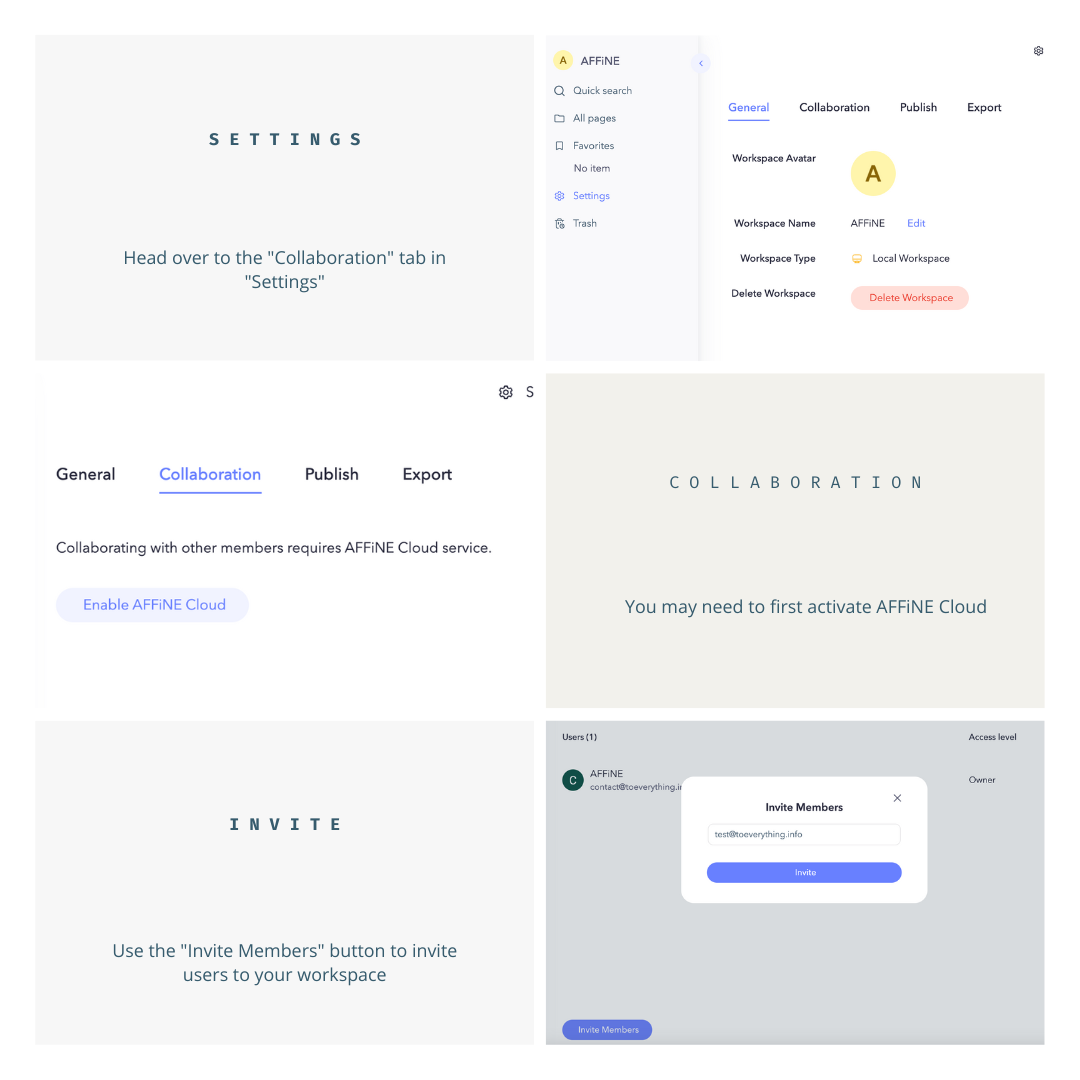
Let's explore how to collaborate with an image:
|
|
|
|
|
|
|
|
```JavaScript
|
|
// We can also write code in a code block
|
|
let scrambled = "V2VsY29tZSB0byBBRkZpTkU="
|
|
|
|
// To-do - function to unscramble
|
|
```
|
|
|
|
And for some future features and updates, let's make a to-do list:
|
|
|
|
* [ ] Database Block
|
|
* [ ] Desktop and mobile clients
|
|
* [ ] Edgeless update (whiteboard mode)
|